Hi. Me again. Remember last week when I shared with you an exciting Copilot Studio + Power Automate being better together blog post? Well… about that…
One of the hardest parts of building with Copilot Studio and Power Automate isn’t getting something to work. It’s understanding why something that *used* to work now suddenly *doesn’t* 🙂
Yesterday was a perfect example of that.
What started as a simple failure – my weekly automated insights not generating and delivering – turned into a full debugging exercise across:
- Copilot Studio Agent
- Embedded Flow (Tool)
- Power Automate orchestration (Scheduling Flow)
- Output formatting (HTML vs. Teams)
And like most real-world issues, nothing initially pointed to the actual problem. Buckle Up!
The Symptom: “It Used to Work”
Everything was stable. Until it wasn’t. I have tested this for weeks before I wrote my blog. The architecture was sound.
- Scheduled Flow (Trigger) ->
- Dynamic Input Assembly (context payload) ->
- Call Copilot Studio Agent ->
- Agent Pulls -> Prepare Data (ADO) ->
- Agent processes & returns structured output ->
- Dual Output ->
- Email (HTML formatted) + Teams Adaptive Card (JSON)
- Dual Output ->
- Agent processes & returns structured output ->
- Agent Pulls -> Prepare Data (ADO) ->
- Call Copilot Studio Agent ->
- Dynamic Input Assembly (context payload) ->
The Scheduling Flow calls an Agent. An Agent calls an ADO retrieval tool. It formats a structured response. It returns that in structured output based on Email (HTML) or Teams (JSON). It worked!
Then suddenly Emails were blank and Teams posts never came. Something broke.
Compare Known Good vs. Bad
Instead of guessing, the first move was pretty simple:
- Go to Scheduling Flow Runs – Open a Known (last) Good + Open a Bad
- Compare
- Same flow
- Same agent
- Same prompting
- Same same same.
Okay, I didn’t change it. It rules out a prompt issue. It rules out a logic issue. It rules out formatting issues.
When two runs are identical except for outcome, it’s almost never the business logic. It’s something external.
Look at the Failure Output
The key insight came from looking at the Scheuduling Flow. I brought up one of the failed runs.
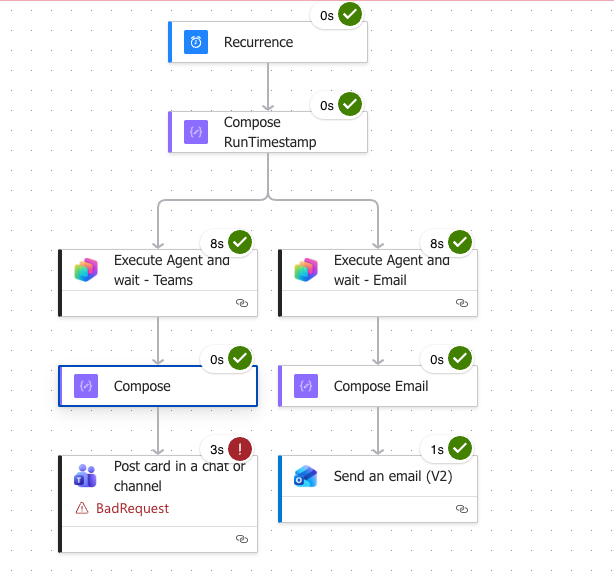
It looked like everything was “good” except for the Teams Post. Right? So you think it’s Teams. But, let’s look closer. Let’s look at the “Compose” above.
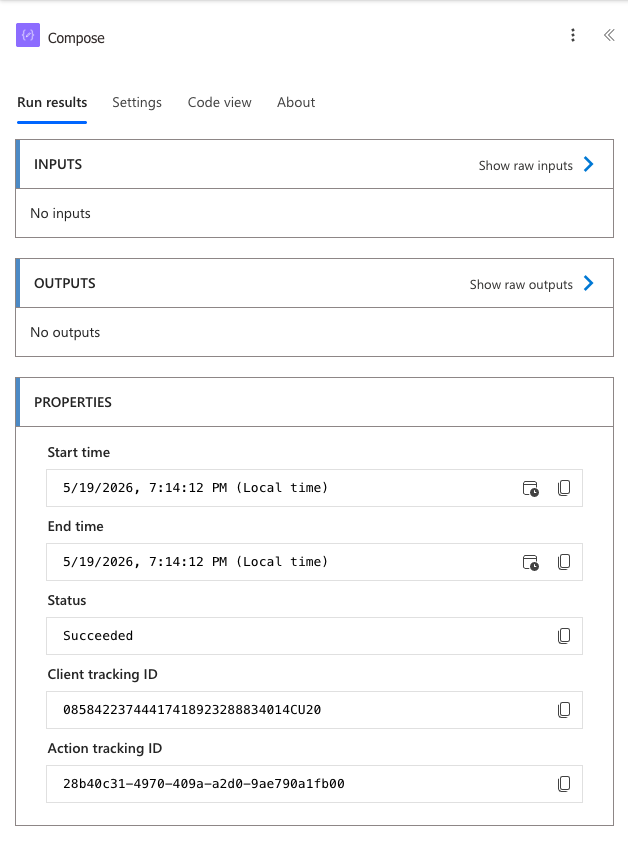
It said “Succeeded” but Input and Output are blank. Odd. The compose above Email was the same. Okay, that means that nothing came from the Agent itself! Let’s go back one more step to the Agent and see what we can see.
Let’s click on Execute Agent and Wait.
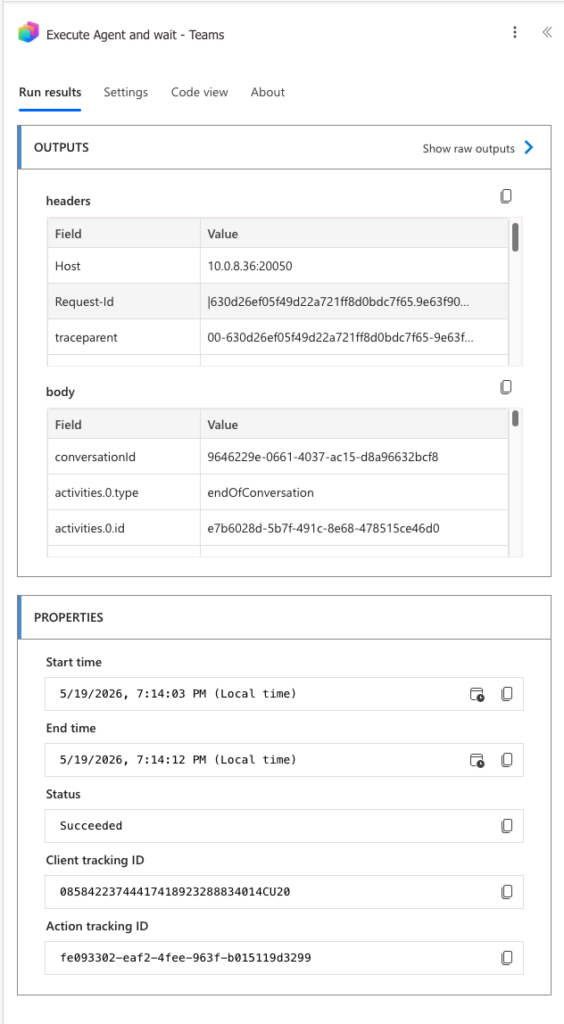
It says Succeeded but we know we didn’t get Output! Let’s click on “show raw outputs” and review that.
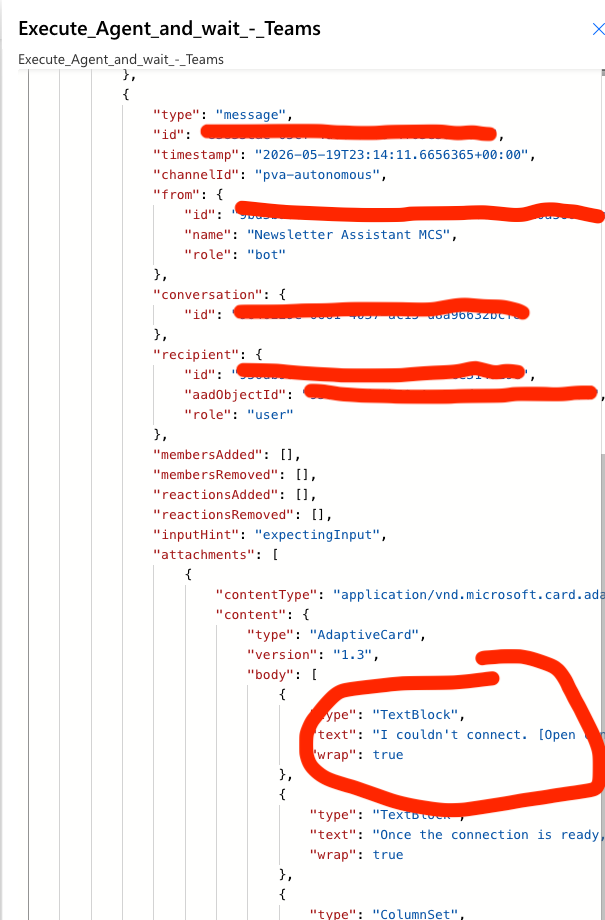
Wait, what’s that? I couldn’t connect. Let’s capture all of that text.

Huh. Interesting. On my failed runs. I’m not able to connect to something.
Follow The System Signal (Don’t Guess)
The error says exactly what to do. Open Connection Manager. Let’s click that link!

Bingo! Remember from the last time, my Copilot Studio Agent has a built-in Flow (Tool) that does my work. That specific error was happening in the Agent and it’s failing before the Tool execution!
It looks like my authentication/credential suddenly went Stale. Let’s click Review and fix that.

Now I save and Publish the Agent again, to refesh all of the Embedded Tools (and that auth issue above).
Now let’s run Scheduling Flow again.
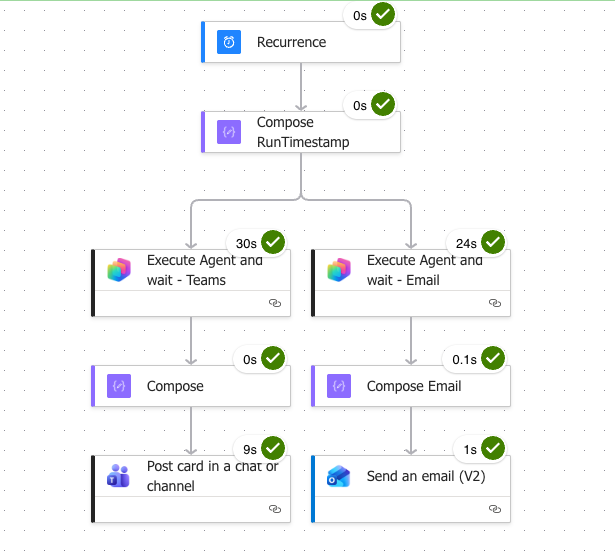
Beautiful! Email received with data. Teams post successful. What broke was authentication in the embedded Flow (Tool) of the Copilot Studio Agent. We had to work backwards to get there!
Key Takeaways
This one was a little more complex at least to me. It required digging further into some unknown knobs and twists of our Power Automate and Copilot tooling. Here are some “Uncle DW” takeaways…
- Always compare known good vs. bad
- Don’t guess. Check the differences in behavior.
- Raw outputs matter more than UI symptoms
- The UI showed a failure. The JSON told us exactly where.
- “Stale” doesn’t mean “Broken”
- Connections were valid. The reference wasn’t. We had to review & refresh it!
The biggest lesson learned here wasn’t technical – it was operational. When Copilot-based systems fail, the problem (so far for me at least) hasn’t been where I thought it was. It usually is:
- Identity
- Binding
- Instructional Contract
If you approach debugging by isolating where execution actually stopped, you’ll get to the root cause much faster and avoid rewriting things that already work. Slow down. Don’t assume. Don’t make it worse!