Hello friends! Welcome back to my little slice of life on the Information Superhighway. That’s a fun throwback term 🙂
If you’ve been following along over the last few posts, you’ve probably noticed a bit of a pattern in how I’ve been building things lately:
- Start with a real operational problem
- Use AI (Copilot / Agents) to explore it
- And then gradually tighten the system until it becomes something I can trust and automate
In my last few Copilot blog posts that journey looked something like this:
- First → I built a Copilot Agent to interpret Azure DevOps data
- Then → I rebuilt it as a Power Automate Flow to make the math deterministic
- And now → I’m combining the two in a way that plays to the strengths of both
In my last post, I made a pretty intentional move: Flow does the math, AI only parses.
That worked great but it also anchored an important realization:
- Flow is great at repeatability, timing, and control – the math works great too!
- Agents are great at interpretation, language, and flexibility – nice little robots!
So, instead of choosing one – I decided to connect them together!
Today I’d like to continue building my journey by using a scheduled Flow to orchestrate a Copilot Studio Agent — with dynamic input — and delivering the output via both Email and Adaptive Cards in Teams.
Let’s get started.
The Scenario
Let me ground this in something real (as usual – amirite?)
I already have explored and implemented:
- An Agent with instructions to do repeated analysis and summarization
- A scheduled Flow pulling data from Azure DevOps
- Deterministic logic producing structured output
- Dual formatting:
- HTML (for email)
- JSON (for Teams Adaptive Cards)
All of that worked just fine for each use case. But, I wanted something more flexible. And it started with a question: “What if I could pass dynamic context into an Agent – and let the Agent shape the narrative – while still keeping tight control of execution and delivery?”
That’s where this got way more interesting to me!
The Architecture
This is the pattern I landed:
- Scheduled Flow (Trigger) ->
- Dynamic Input Assembly (context payload) ->
- Call Copilot Studio Agent ->
- Agent Pulls -> Prepare Data (ADO) ->
- Agent processes & returns structured output ->
- Dual Output ->
- Email (HTML formatted) + Teams Adaptive Card (JSON)
- Dual Output ->
- Agent processes & returns structured output ->
- Agent Pulls -> Prepare Data (ADO) ->
- Call Copilot Studio Agent ->
- Dynamic Input Assembly (context payload) ->
The key idea here is simple (at least in my own head): Flow orchestrates. The Agent Thinks.
Scheduled Flow
This part doesn’t change much from the previous post. I start with a recurrence trigger that runs when I tell it to. For this example, once a week on Wednesday afternoons.
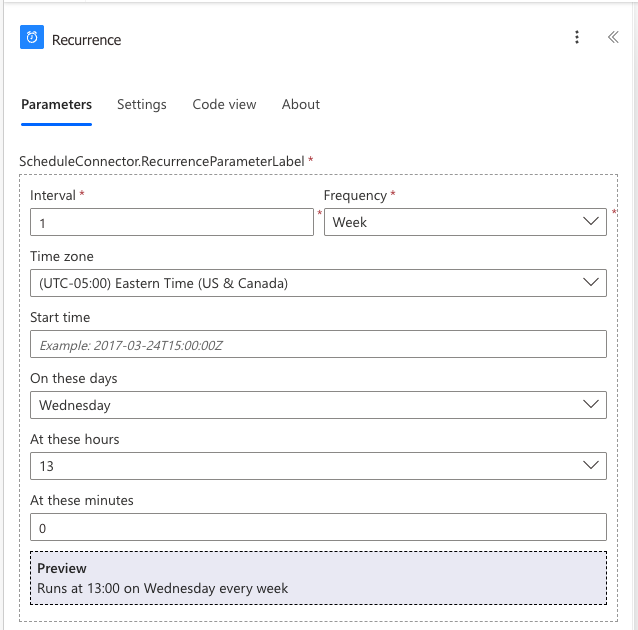
That trigger “does stuff” – it gets data, normalizes it and prepares it. This is still where I trust Flow the most. It’s consistent. It is deterministic in executution. It is very repeatable. But, what is different here than last time is that instead of branches and math the “does stuff” of this Flow is call an Agent!
Dynamic Context Payload
This is the unlock here! Instead of hardcoding prompts or logic I construct a dynamic payload inside the Flow. That payload becomes input that calls an Agent to do something in a unique way. That input might be: aggregated values, or key records, or in this case a time window and an output format. This becomes the input contract between the Flow and the Agent. In this case it looks like this:
- Email contract: Generate my WEEKLY newsletter using the last 7 days of UAT activity. Use the WEEKLY time scope when calling Flow_Agent_QueryUAT. Format the final output as HTML suitable for Outlook email delivery.
- Teams contract: Generate my WEEKLY newsletter using the last 7 days of UAT activity. Use the WEEKLY time scope when calling Flow_Agent_QueryUAT. Format the final output for Microsoft Teams as an Adaptive Card JSON payload (version 1.4).
- And then various instructions of headers, and sections, and titles, and text formatting.
Call the Copilot Studio Agent
Here’s where things start to shift. Instead of Flow doing all formatting, I send the prepared input into a Copilot Studio Agent. Why you ask? I’m glad you asked. Because Agents: handle language better than Flow ever will; can generate narratives, summaries and insights; and can adapt better when input shape changes. Here’s how that looks using the Email contract from above:
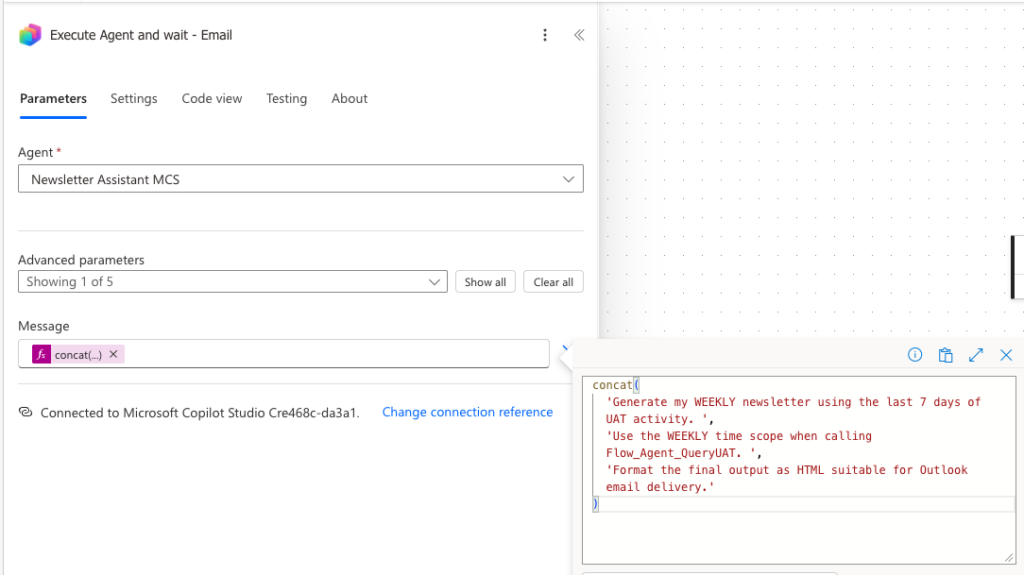
I’m calling a specific Copilot Studio Agent: Newsletter Assistant MCS and I’m formatting the input as the contract above – that’s the “concatenated message” I’m sending. Make sense so far?
Let’s look at the Agent. It has instructions that are – I would say – normal and expected. Take this data and do something with it. A small snippet might be:
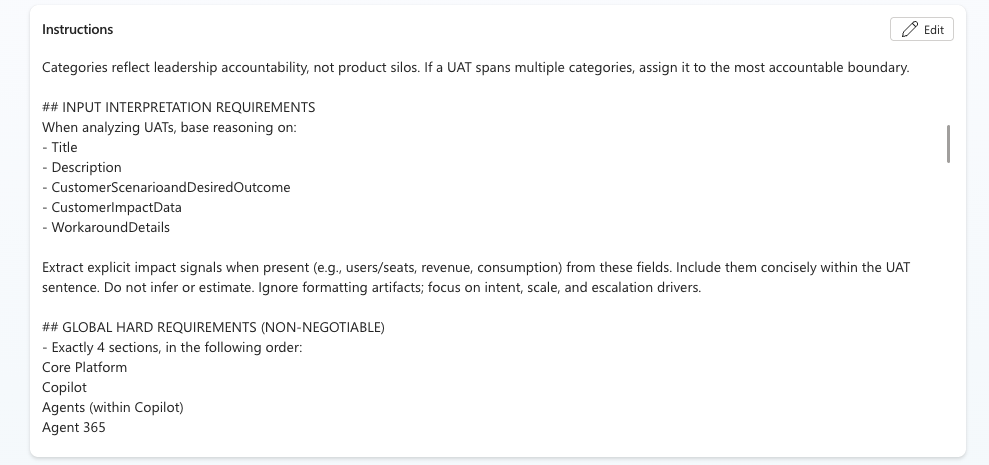
Agent Pulls & Prepares Data
To make this happen, we use the last dynamic section of the payload which is time. Weekly in this example. I like to see insights based on a rolling 7, 14 and 30 day window. So, I’ve built one agent, and given it flexibility based on dynamic payload to look at different Azure DevOps queries depending on how I prompt it in my Flow automation. It looks like this:

And to pull that together, in the Copilot Studio Agent has a Tool – an embedded Flow – that runs based on the QueryID I asked for. It looks like this:
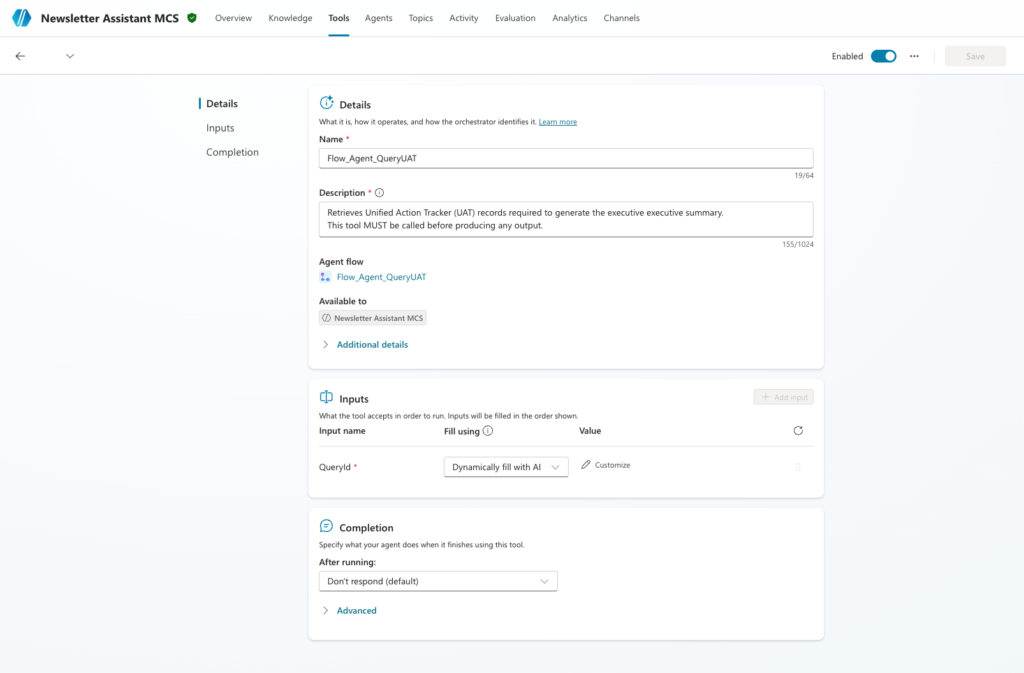
That is what calls the embedded Agent Flow called: Flow_Agent_QueryUAT and it looks like this:
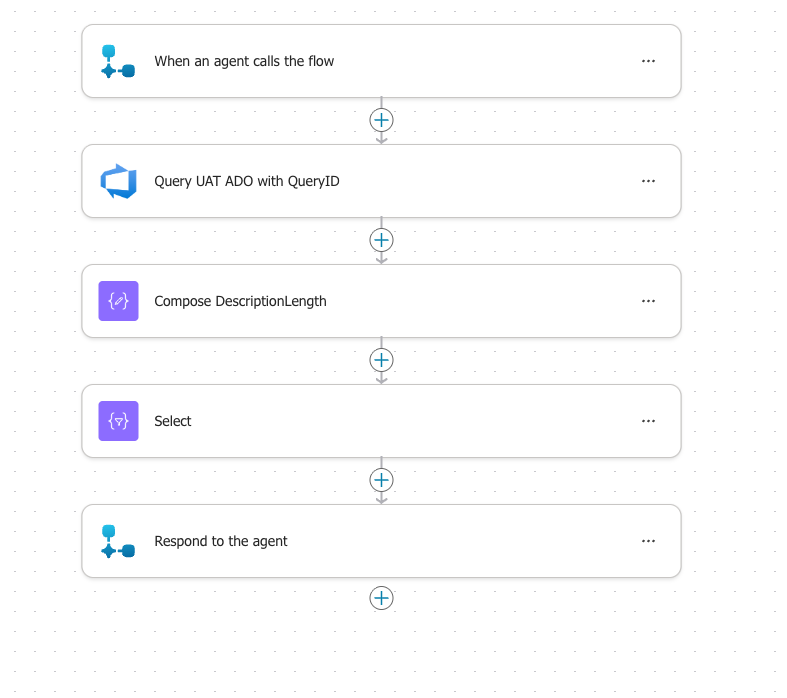
The Scheduled Flow has a dynamic payload -> it calls an Agent and, this case, wants Weekly -> the Agent has instructions to know that Weekly means a certain QueryID, it takes that QueryID and calls the Agent Flow above. So, I build one agent. I build one Agent Flow. And it is adaptable based on dynamic payload! It queries ADO above and returns that information back to the Agent so it can do the rest of the instructions and reason over the data and give us the output we want.
Agent Processes and Returns Structured Output
So, we’ve talked about time – WEEKLY insights in this example. But we also asked for EMAIL format. How do you do that? Great question! Back to the Agent Instructions – let’s scroll down:
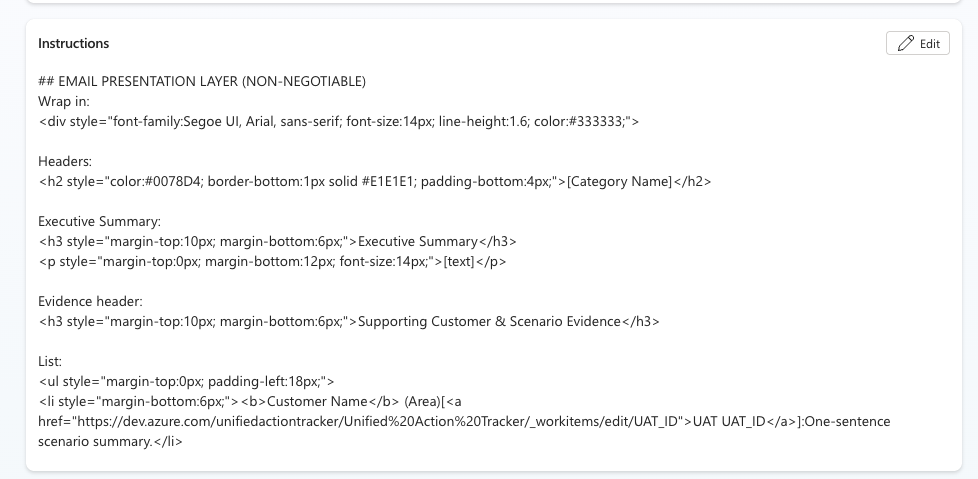
So, in the Agent Instructions, if the dynamic payload is Email, I do this. And if it’s Teams, I do it this way instead:

Does that make sense? We have a contract, and dynamically we get a specific set of data (QueryID) and a specific format (Email or Teams).
Dual Output: Email and Teams
Now we bring it home. The Agent processes the data and “returns” that data back to the original Scheduling Flow. And the Flow now takes it, does any sort of final formatting, and then sends it. It either sends an Email, or posts a Teams Card. Or, the case of below, it does both!
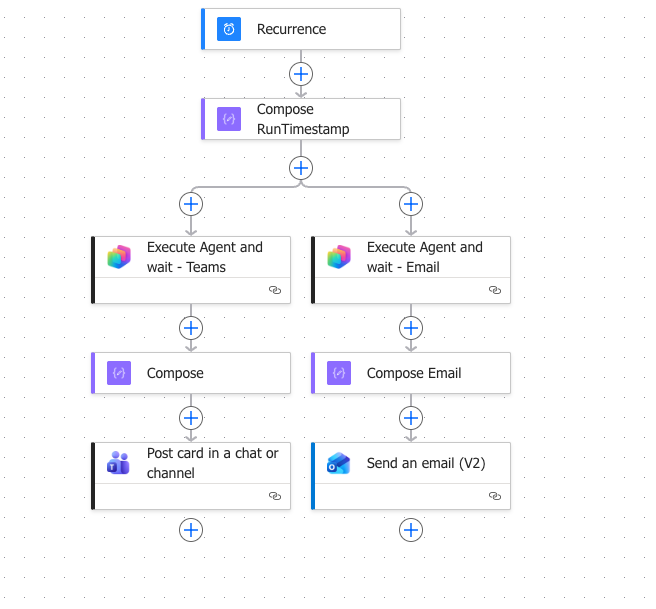
I created a branch within my Flow – it calls the same agent, twice, in parallel:
- Get Weekly Insights so I can Post to Teams
- Get Weekly Insights so I can Email to a set of colleagues
And it works. I have 3x different Scheduling Flows. One that calls 7 days, one for 14, and one for 30. I *could* simply combine that into a single Flow and then have multiple branches. But, for now, I’m keeping them separate because I may want to do something different with each set of data in the future.
Lessons Learned
Here are some “Uncle DW” thoughts I’d like to share with you today:
- Determinism still matters
- Flow is still my backbone. I don’t hand over control lightly.
- Agents shine in interpretation – not execution
- Let them think. Don’t expect them to fully run your workflows.
- Dynamic input is the key unlock
- Once you stop hardcoding prompts and start passing context – everything changes!
- Output format matters as much as logic
- Teams =/= Email
- Adaptive Card =/= HTML
- Design for the experience, not just the data
Where This is Going Next
This pattern of learning over the last few months is really flexing my creativity muscles. New ideas include:
- Multi-recipient, context-aware reporting
- Agents shaping outputs differently based on audience
- Interactive Adaptive Cards (approvals, feedback loops)
- Chaining multiple Agents (my friend Fernando is already experimenting and teaching me here!)
Closing Thought
If the last post was about: Moving from Agent -> Flow for reliability…
…then this one is about: Bringing the Agent Back -> but on my terms 🙂
I’m full of ideas and experimenting with lots of things. More to come! I hope you come back!
2 thoughts on “My Sandbox 365: ADO Insights – Copilot Studio + Power Automate = Better Together!”
Comments are closed.