Hi friends, me again! It’s a new Fiscal Year at Microsoft. I’m in the same role. Same team. Doing pretty much the same types of things; however, my curiosity is growing as I continue my journey to dive deep into various Copilot-y/AI-y things. You may have been following along or you may be new here – short confession – I’m an old dog. But I’m learning new tricks. Woof.
I also like to share what I’m learning. So, today, I wanted to talk about a new Copilot feature that started shipping about a month or so ago. It may seem simple on the surface, but, I think it’s one of *those things* that will rocketship the adoption for companies just dabbling in AI today. Let’s go.
Backstory
For the past few years, most organizations have approached Conversational AI – like M365 Copilot – the same way. You deploy the licenses. You train the users. You try to teach them about “prompting” – maybe even with prompt champions. Then you hope adoption follows and people find new ways to work using the new shiny tool you rolled out. Sound familiar?
The challenge that I – and probably you – have found is that prompting is still largely tribal knowledge. One salesperson figures out a great account planning prompt. A project manager discovers the perfect meeting recap prompt. A consultant builds a powerful executive briefing prompt.
And then those prompts live in chat history, OneNote pages, Loop, Teams messages, or someone’s personal notebook repository.
Microsoft’s latest enhancement of the Copilot Prompt Gallery changes that. This new capability started shipping in June and should be in your tenant now so that you can create curated prompt collections and distribute them across your tenant.
As I mentioned, at first glance this may seem like a minor feature. But, I think it is one of the most important Copilot adoption capabilities Microsoft has released so far.
Why it matters
When organizations started using Word, Excel, and PowerPoint, they quickly realized that not everyone should start from a blank page. Organizations created:
- Templates
- Standards
- Playbooks
- Best practices
- Reusable content
Prompting is going through the same evolution. The reality is that most users are not prompt engineers—and they shouldn’t have to be. The best prompts often emerge from:
- Sales teams
- Consultants
- Project managers
- Customer success managers
- Executives
- Business analysts
These prompts represent organizational knowledge. Now organizations can operationalize that knowledge and accelerate AI ROI!
Instead of teaching everyone how to build the perfect prompt, organizations can publish proven prompts once and make them available to everyone.
How would I use it?
In short: the Prompt Gallery is a centralized place where users can discover, save, and reuse prompts for Microsoft 365 Copilot experiences.
Think of it as a prompt library.
Instead of repeatedly typing: “Summarize this meeting and create action items by owner and due date” you can save that prompt and reuse it. Microsoft already provides hundreds of examples covering scenarios such as:
- Meeting preparation
- Email analysis
- Content creation
- Data analysis
- Executive summaries
- Brainstorming
- Research
The new capability extends this concept to the organizational level – making it more “personal” to you and your company.
Imagine a company creating a Prompt Gallery collection that includes:
Sales:
- Account plan generation
- Opportunity review summaries
- Executive sponsor briefing notes
- QBR preparation
Customer Success:
- Health check summaries
- Adoption reviews
- Stakeholder mapping
- Escalation analysis
Consulting:
- Workshop preparation
- Requirements extraction
- Executive readouts
- Solution recommendations
Project Management:
- Status reports
- Risk analysis
- Action item tracking
- Steering committee updates
Instead of every employee reinventing these prompts, everyone starts with the same proven patterns.
That accelerates adoption and improves consistency.
Okay DW. I’m in. Now what?
I’m glad you asked! Let’s get started:
Let’s start with what you know. Start with Copilot Chat. This should look somewhat familiar.
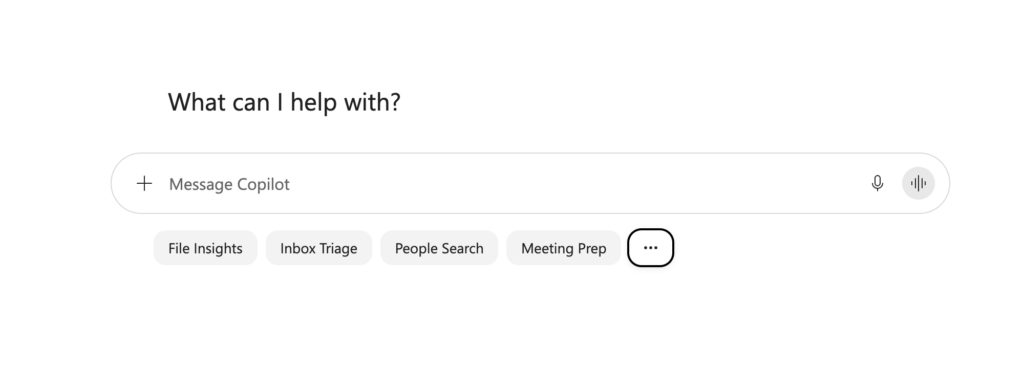
Click that (…) three dots menu to bring up the Prompt Lab.
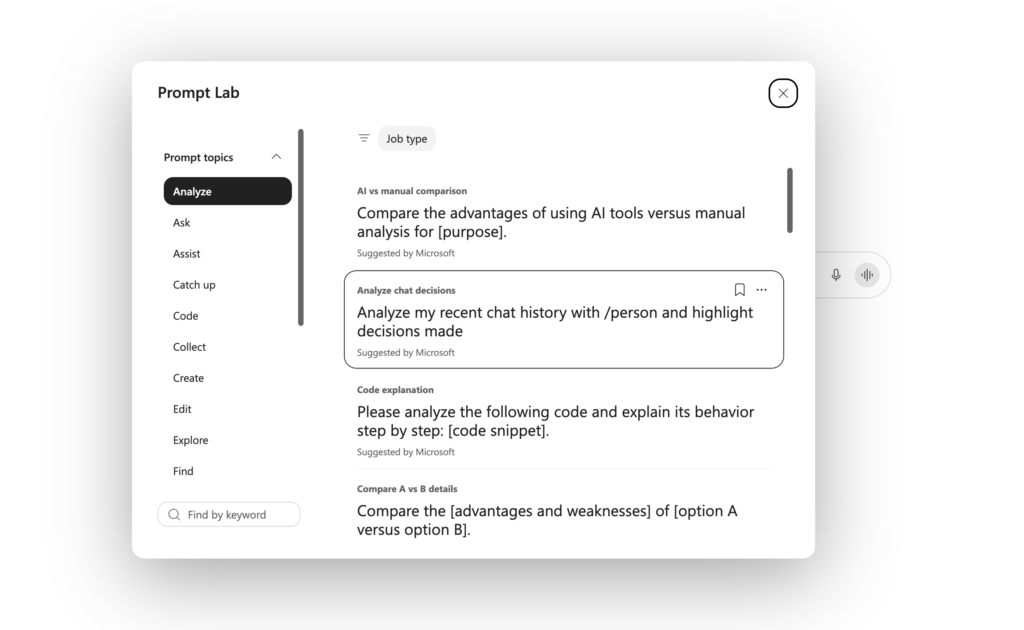
Microsoft has provided for you a lot of example prompts that you may like. You’re probably using some of them. And if you like them, what do you do? You remember them. Or copy/paste them to that notebook or Loop or OneNote that we talked about.
That isn’t interesting. Do you know what *is* interesting? What about creating custom, organizational-specific prompts, and have them displayed to you in Copilot Chat so you aren’t just seeing *standard* prompts, but, *curated* prompts for your business? You know – those prompts that are built around
- Internal terminology
- Business processes
- Standard deliverables
- Executive formats
- Customer engagement models
The more specific they are to your organization, the more value they’ll provide.
Let’s do that. Navigate to M365 Admin Center -> Copilot -> Prompts
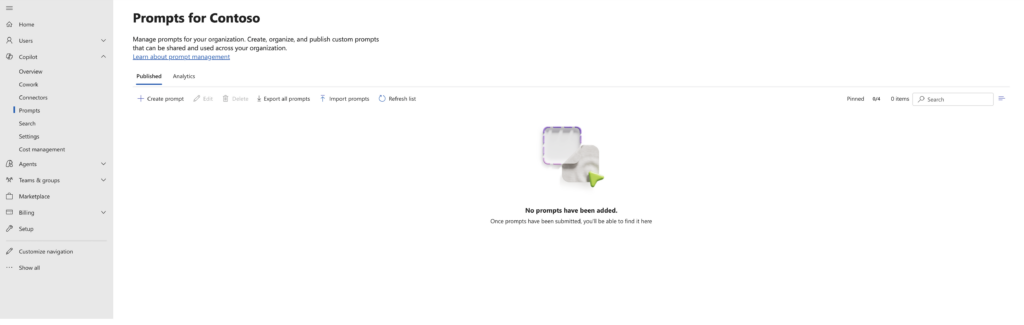
This is where you can add, remove, import-in-bulk, and then effectively manage your Organizational Prompts. Let’s make one. Click Create prompt. You’ll notice a fly-out window to guide you.
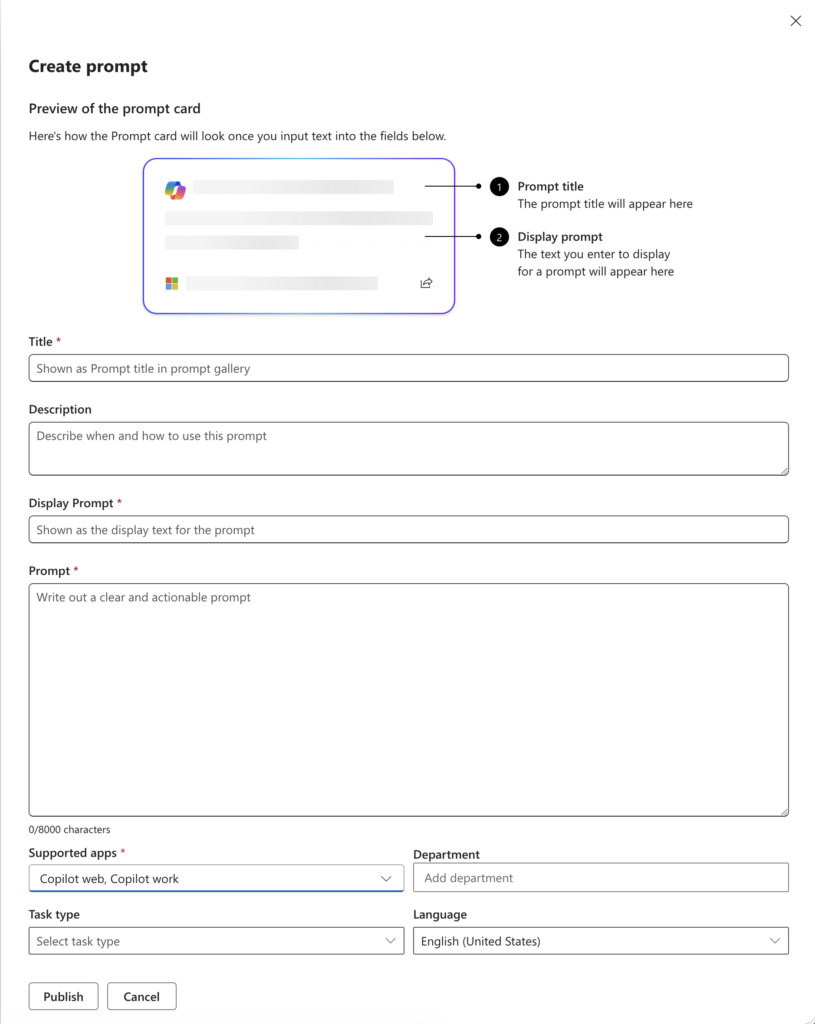
Here is a super simple prompt I just created today:
Then give it a “Microsoft Minute” and then that prompt will show up for your users in Copilot! Here it is in “dark mode” for you 🙂

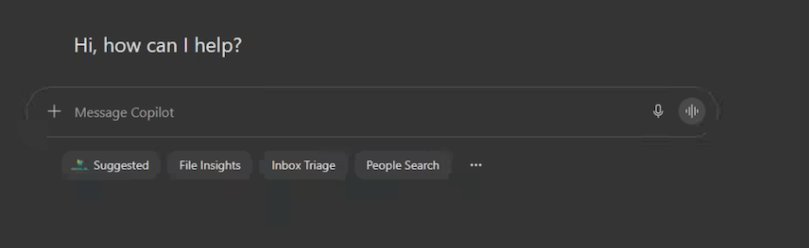
Notice that “Suggested” box? That’s new! But what if you click the … (three dots) like before?
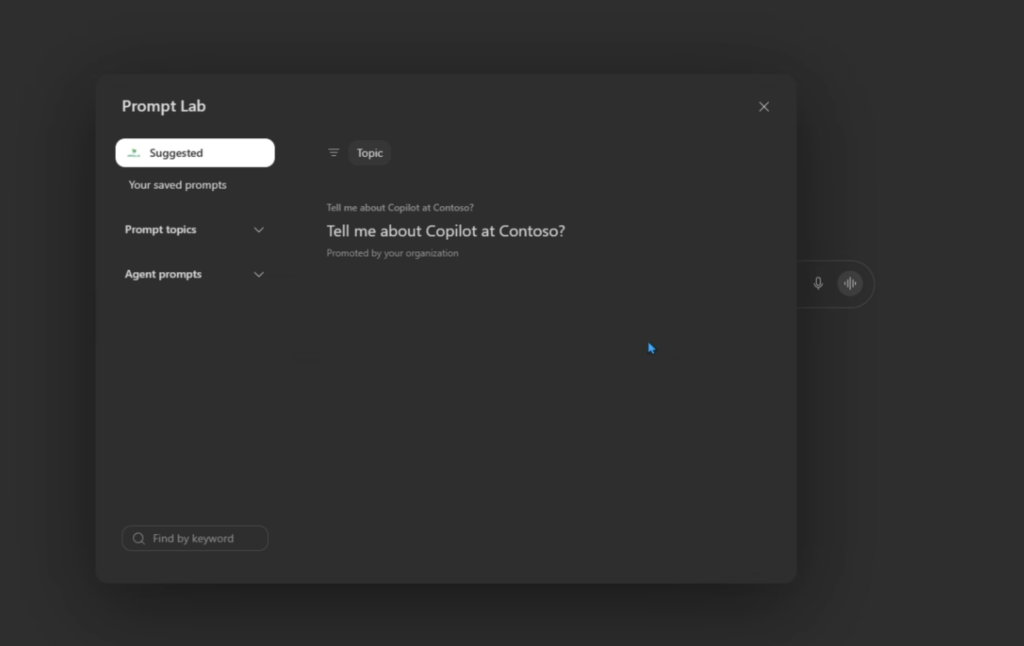
Yup. There ya go! You make (or import) and manage them in M365 Admin Center. You use them in M365 Copilot. Easy!
What about you?
Now imagine what that might look like for you and those really important institution-wide prompts!
The organizations that I think will succeed the best with this won’t publish thousands of prompts. They’ll curate and publish the exceptional ones. The ones that have the greatest – and widest – impact. Think:
- Weekly Status Report
- Executive Briefing
- Customer Escalation Summary
- Account Planning Review
- Stakeholder Analysis
- Meeting Readout
- Employee Onboarding
- Risk Assessment
- Business Case Creation
Quality matters more than quantity here.
Final thoughts
A year or so ago, many organizations were asking: “How do we teach prompt to prompt?”
Today the better question is: “How do we capture and scale the prompting we’re already developing?”
Capture and scale. That’s why I think this new Copilot Prompt Gallery is more important than it may first appear.
It’s not just a new button, or a new search capability. It’s turning prompts into that reusable organizational capability and IP.
I think just like templates of yore transformed how we create docuemnts, curated propmpt libraries will transform how organizations work with AI.
And for many – this could be the difference between deploying Copilot and actually adopting it. This smells like ROI fuel to me!
Until next time. Be well friends!
1 thought on “My Demo 365: Microsoft Copilot Prompt Gallery”
Comments are closed.